
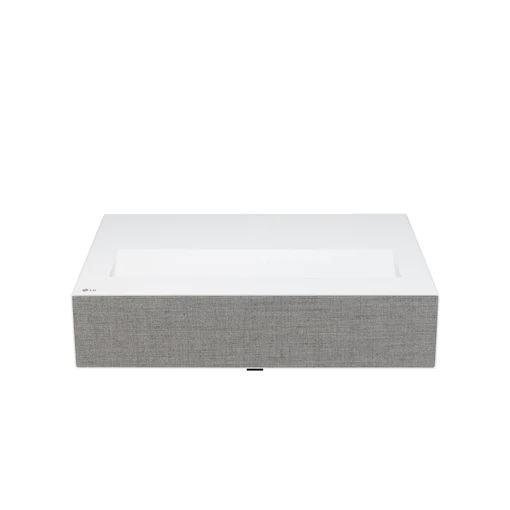
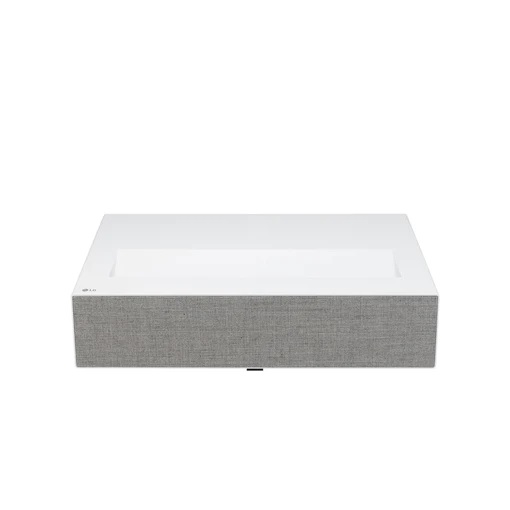
LG CineBeam HU715Q - 4K UHD Laser 2500 Lumens Ultra Short Throw Projector Read more
Key Features
Bring Your Favourite Games to Life
Buy a new LG Cinebeam projector and save £249.99 on your dream gaming setup
Just a Span for Projecting 100-inch screen
Set up your own theater anywhere around the house with LG Ultra Short Throw Laser 4K CineBeam.
Display
Ultra Short Throw
4K UHD (3840x2160)
2,500 ANSI Lumens
Imaging Technology
Brightness Optimizer Ⅱ
- Auto Brightness
- Adaptive Contrast
Usability
webOS
Apple AirPlay 2 & HomeKit
Built-in 20W+20W Stereo
Ultra Short Throw Ratio
LG Ultra Short Throw CineBeam gives vivid imagery within an exceptionally short projection distance. Create an impressive home cinema screen up to 120 inches*.
Designed for Harmonic Interior
By applying a sophisticated and compact design with premium material from Kvadrat**, it seamlessly blends in your home interior.
*It can project an 80-inch screen from a distance of 11.8cm, a 100-inch screen from a distance of 21.7cm, and a 120-inch screen from a distance of 31.7cm.
**Textiles by Kvadrat. Kvadrat is a Danish textile company.
Real 4K UHD Laser Projector
Vivid and Clear Picture Quality
With 8.3 mega pixels utilizing 4K UHD Laser technology, LG CineBeam delivers precisive details up to 120-inch screen. With 2M:1 contrast ratio it can express the deep darkness and brightness. And it accurately represents colours in an indoor environment, thanks to a colour gamut 85% of DCI-P3 and 2,500 ANSI Lumens brightness.
8.3M Pixels
Real 4K UHD
DCI-P3 85%
colour Gamut
2,000,000:1
Contrast Ratio
2,500 ANSI
Brightness
*The figures of contrast ratio and colour gamut are the measured value from internal testing.
*The marked brightness, the measured value from internal testing, is based on the brightness standard that users perceive.
*The above figures are based on ‘Brightest mode’ and may vary depending on your environment.
*The colour gamut is based on 'Vivid mode’ and the colour reproduction range may vary depending on the picture mode you choose.
A New Level of Clarity
HDR improves quality by making the bright part brighter and the dark part darker while using the dark side details. So, it is compatible with almost HDR industry standards.
Dynamic Tone Mapping
Using meaningful signal range (frame by frame) instead of simple signal range.
HDR10
Individual tone can be adjusted for each colour within a scene.
HLG
HLG is a backwards-compatible HDR standard and begins with a SDR signal that any TV can use.
HGiG
HGiG helps you to enjoy HDR console games from PlayStation and Xbox.
*HDR covers almost all HDR specifications, including HDR10, Dynamic Tone Mapping, HLG, HGiG and other specifications.
*The images simulated to enhance feature understanding. It may differ from actual use.
Brightness Optimizer Ⅱ*
It's an important technology for imagery quality that only LG CineBeam has.
Auto Brightness**
Check, Adjust, and Project Automatically
The built-in ambient sensor automatically recognizes the lighting conditions and adjusts the brightness mode suitable for the naked eye. So, you can watch the content with screen brightness optimized for ambient.
How to Operate the Auto Brightness
Recognizing the ambient light environment by the built-in ambient sensor, 'energy saving level' is automatically set, thereby providing screen brightness optimized for the surrounding environment.
Adaptive Contrast
Fits Laser Output to the Scene
Adaptive Contrast gives more depth to your image by adaptively adjusting the Laser output to image, in order to create a high contrast ratio. Bright scenes appear brighter, while dark scenes remain detailed with deep blacks and shade detail.
*Brightness OptimizerⅡ includes Auto Brightness and Adaptive Contrast. It controls the amount of electric current depending on the brightness of the original image, while the ambient sensor optimizes the brightness by automatically recognizing the ambient lighting conditions.
*The images simulated to enhance feature understanding. It may differ from actual use.
**To run 'Auto Brightness', you can turn on the ambient sensor by accessing the ‘Brightness OptimizerⅡ’ menu using the magic remote control and turning ON/OFF the 'Auto Brightness’. (During use this function, Energy saving menu is disabled)
**Iris mode that physically controls the contrast ratio is NOT supported.
The Smart Way to Access Content
With webOS 6.0, you can explore a variety of TV shows and movies with a simple connect to your Wi-Fi network. Also, you can enjoy video contents with built-in apps like Netflix, Amazon Prime Video, Disney+, YouTube and Apple TV.
Magic Lighting Remote Control
With Magic Lighting Remote Control, you can just press the Home button and easily control webOS. Its lighting function allows you to control it conveniently even in a dark room.
Apple AirPlay 2 & HomeKit
Let's Share Your Content at Home
With LG smart projector, simply share your entertainment from supported Apple devices - iPhone, iPad, and Mac - using AirPlay to the high-definition large screen.
How to Use Your Apple Devices with LG CineBeam Properly
Stream video from Apple device to LG CineBeam
Mirror your Apple device to LG CineBeam
Mirror your Apple device to LG CineBeam
*Your Apple device must be connected to the same Wi-Fi network as your projector.
*Apple, the Apple logo, AirPlay, Apple TV, and HomeKit are trademarks of Apple Inc., registered in the U.S. and other countries.
*This LG CineBeam supports AirPlay 2 and requires iOS 12.3 or later or macOS 10.14.5 or later.
Built-in 20W+20W Stereo
Incredible Surround Sound Experience
By featuring the new arrangement of the woofer and passive radiator with a vibration attenuation speaker structure, it can provide deep and clean bass while reducing screen and sound shake. With the improved 2.2Ch (Quad WF) 40W sound, you can enjoy the cinematic sound experience like a real movie theater.
2.2 Ch included Quad Woofer
2.0 Ch : Tweeter 2ea + Woofer 2ea (L/R) on the front that can reproduce the full range
0.2 Ch : Woofer 2ea (L/R) on the back to enhance the bass range
Bluetooth Surround Ready
4.2 Channels Effect
By connecting two extra wireless Bluetooth speakers to compose a sound system, you can enjoy surround sound with the projector’s built-in speakers and Bluetooth speakers.
*Needs to purchase Bluetooth speakers to use this function. Only LG Bluetooth speakers are guaranteed.
*4.2 channels effect : 2.2 Ch is implemented in virtual. Need to connect two Bluetooth speakers for 4.2 Ch effect.
Motorized Focus
You can easily adjust the focus by using the magic remote control. No longer have to approach distant ultra-short throw devices to focus.
4/9/15 Point WARPING
With the improved 4/9/15 Point WARPING supporting not only 4-corner but also 9-point and 15-point warping functions, you can adjust screen distortion and set up a more precise screen.
LG Projection Calculator
You can simulate LG projector in your space with LG Projection Calculator.
| Specifications | Descriptions |
|---|---|

Loewe MR1 Speaker Free